
My 2026 iPhone Homescreen
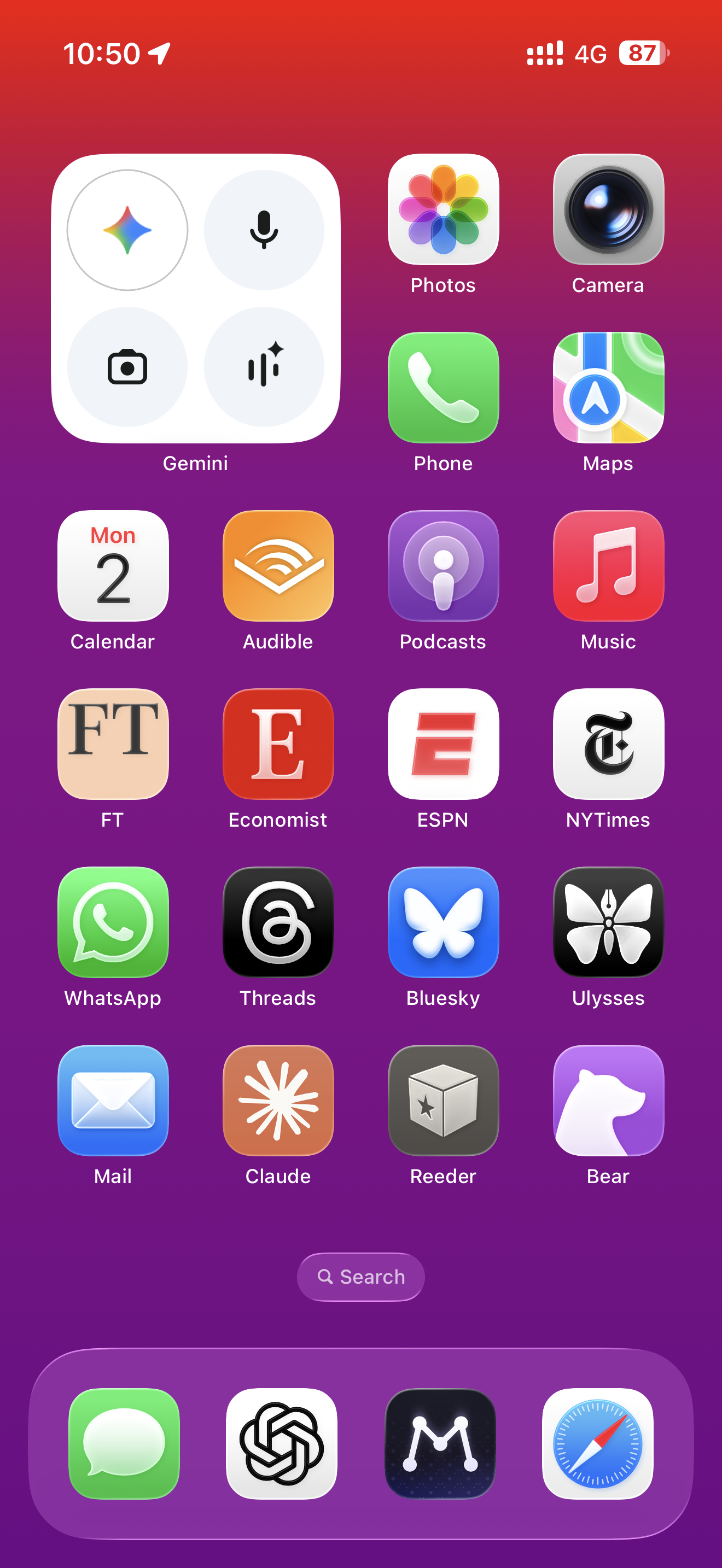
Well this is embarrassing. I'm always somewhat late to posting my yearly iPhone homescreen post, but this is the first time it has slipped into February. Still, here we are and the screenshots must go on, just as they have in 2025, 2024, 2023, 2022, 2021, 2020, 2019, 2018, 2017, 2016, 2015, and 2014.
While this year may not look dramatically different from last year's, it may also be the last year before some really major changes if, as expected, there's a new type of iPhone released in the fall: the 'iPhone Fold'. And if, I decided to switch to that as my daily driver. I highly suspect that I will – certainly at least to try it out – but we'll see. While I think the Pixel Fold has given me a glimpse into what this will be like, I suspect Apple's entry may be a bit different. Notably, the size and ratio of the device may be different (think: shorter and squatter when folded, and iPad mini-like when unfolded). Regardless, the homescreen is going to be wildly different – certainly when unfolded.
Anyway, we'll get to that in early 2027. For now, the main differences for 2026 are around, unsurprisingly, AI. Starting with my top left widget (my standard widget basically since widgets were introduced into iOS in 2020 or so) which is now full-on Gemini. Think of it as my way to get ready for our Google-powered Siri, which seems to be fast approaching.
It will be interesting if that integration makes such a widget – and the Gemini app itself – superfluous. I doubt it because first and foremost, Gemini will continue to be an app to capture all your AI workflows where as Siri will simply be a system-level integration (read: no app). I'm sort of surprised by such reports – including with the "real" new Siri coming in iOS 27 – and I would bet that Apple backtracks here by iOS 28. Anyway, for now, I have Gemini right up top.1
That's also, in part, because as you can clearly see, I continue to be in full-on AI testing mode. Which is to say, I don't have my "one AI to rule them all". While I still mainly use ChatGPT – hence the continued dock placement – with the release of Claude Cowork (and really, the Opus 4.5 model), I've become very "Claude Curious". While OpenAI continues to have an edge on the consumer-facing product-side (though shout out to Google's strides this past year), Anthropic's underlying models seem very, very good. Many might even say better – and that may even include Apple, who reportedly is all-about Claude internally, and may have gone with Anthropic to power Siri had Google not offered them better terms.
Anyway, there's the Claude app, lingering right above ChatGPT...
Beyond that, and a few placement tweaks, there's nothing really new and different this year. To make room for Claude, I shoved the Apple News app into a folder. I simply don't launch it enough, and mainly interact with it through push notifications. Yes, I still keep Xitter off my homescreen even though I use it quite a bit to scan for news/information. Threads continues to pick up some of that slack, but if I'm being honest, Bluesky is falling in usage for me – might it fall off the homescreen in 2027?
I should probably replace Mail with Gmail, which I do use more. But I also hate the idea of having a constantly used email app on my homescreen. Maybe if Google brings their AI wizardry to the Gmail app – and if it's actually any good – I'll do the swap.
The same could be said with Maps vs. Google Maps – I probably use the latter more, but I do find the data to be increasingly suspect and the design increasingly cluttered, so I do use Apple's variety roughly the same amount (also to double check any directions). I wonder how/if/when AI will change this equation...
Everything else is pretty chalk: Photos. Camera. Phone. Calendar. Audible. Podcasts. Music. FT. Economist. ESPN. NYTimes. WhatsApp. Ulysses. Reeder. Bear.
Ditto the dock: Messages. The aforementioned ChatGPT. Matter. Safari.
One more thing: I still have my "Action Button" set to launch ChatGPT as well, so having the app on the homescreen may be overkill. That's good as I realize I may need to prepare for a world of fewer apps on the homescreen if the iPhone Fold screen really is a completely different (and smaller) ratio...
Thanks for reading, if you enjoyed this, perhaps:
🍺 Buy Me a Pint
🍺🍺 Buy Me 2 Pints (a month)
🍻 Buy Me 20 Pints (a year)
1 And I like having the four dedicated buttons for different AI modes, which all of the AI widgets seem to have coalesced around. ↩